
Freelancing across India has grown from a secondary income stream into a primary career choice for millions of professionals. Designers, content strategists, software developers, legal advisors, and digital consultants now work with businesses across the country.
As an independent professional, delivering quality work is only half the job. Managing client invoices, securing advance deposits, and collecting final project dues are equally vital to running a healthy business.
Unified Payments Interface (UPI) is the primary engine behind digital transactions in India. It enables instant bank-to-bank settlements directly on mobile devices, making it the most preferred payment method for both freelancers and their domestic clients.
However, relying on a personal phone number or static QR code causes serious administrative problems as your client base expands. Managing multiple clients requires dedicated business payment tools that verify funds, automate billing records, and safeguard your income.
This comprehensive guide reviews the top 5 UPI payment tools for freelancers in India. We will examine how modern UPI payment systems operate, how dynamic payment links protect you against payment fraud, and how to select the right platform for your daily business workflow.
The Shift From Personal UPI to Merchant Payment Tools
When starting out, most freelancers share a personal UPI ID or a mobile number tied to Google Pay, PhonePe, or Paytm. While this approach works for occasional projects, it creates serious operational bottlenecks as work volume rises.
A personal UPI setup requires you to stop working, check your personal banking app, match the received amount against open invoices, and confirm the receipt manually.
+-----------------------------------+-----------------------------------+
| Personal UPI Collection           | Dedicated UPI Payment Tool        |
+-----------------------------------+-----------------------------------+
| Static QR code or phone number    | Dynamic QR code and smart links   |
| Manual screenshot verification    | Automated bank verification       |
| High risk of altered screenshots  | Zero risk of fake confirmations   |
| Disorganized bank statements      | Structured billing dashboard      |
| Mixed personal and work finances  | Clear separation of business funds|
+-----------------------------------+-----------------------------------+
Using dedicated UPI tools provides three critical business advantages:
1. Eliminating Screenshot Fraud
A major risk for freelancers is the altered payment confirmation screenshot. Rogue clients can use basic editing apps to generate fake payment screens showing your name and the agreed fee. A dedicated payment platform verifies incoming funds at the banking network level before marking an invoice as paid.
2. Streamlined Account Bookkeeping
Personal bank statements quickly become cluttered when client milestone payments, retainer fees, and personal grocery bills share the same ledger. Dedicated tools organize every payment by client name, project reference, and date, simplifying your quarterly tax calculations.
3. Professional Client Experience
Sending a branded invoice with an embedded payment link or an exact-amount QR code presents a professional image. Clients can tap a link on their smartphone to complete the payment immediately through their preferred UPI app.
Key Features to Look For in a Freelance UPI Tool
Before selecting a payment platform, evaluate the features that directly impact your daily routine and bottom line.
                     Essential Evaluation Checklist
                                   │
       ┌───────────────────────────┼───────────────────────────┐
       ▼                           ▼                           ▼
Dynamic QR Generation      Direct Bank Settlement       Ease of Sharing
Pre-fills exact amount     Funds go straight to you     Works on WhatsApp,
and project reference      without wallet holding       PDFs, and Invoices
Dynamic QR Codes
Unlike a static QR code stuck on a store counter, a dynamic QR code is created uniquely for a specific invoice. It locks in the exact rupee amount and the invoice number. When your client scans it, their UPI app automatically inputs the figure, eliminating typos and partial payments.
Payment Links and Instant Redirection
If you send invoices over email or chat applications, your client should be able to click a single link that opens their installed UPI app directly on their mobile device.
Direct Settlement Speeds
Waiting multiple days for client payments to clear an intermediary wallet can disrupt your operational cash flow. Prioritize tools that direct funds straight to your designated bank account.
Simple, Non-Technical Setup
You should not need software programming skills to accept professional payments. The setup process should involve simple link generation, intuitive settings, and easy invoice attachments.
Top 5 UPI Payment Tools for Freelancers in India
+------------------+------------------------------+---------------------------+
| Tool Name        | Best Suited For              | Primary Strengths         |
+------------------+------------------------------+---------------------------+
| 1. Tinave        | Dynamic QR, Links, Auto-Check| Direct Settlement, Safety |
| 2. Razorpay      | Multi-Currency & Card Mix    | Large Feature Ecosystem   |
| 3. Cashfree      | Split Payouts & Retainers    | Flexible Link Settings    |
| 4. Instamojo     | Simple Digital Storefronts   | Beginner Friendly         |
| 5. Paytm Business| Local & In-Person Freelancers| High Brand Familiarity    |
+------------------+------------------------------+---------------------------+
1. Tinave
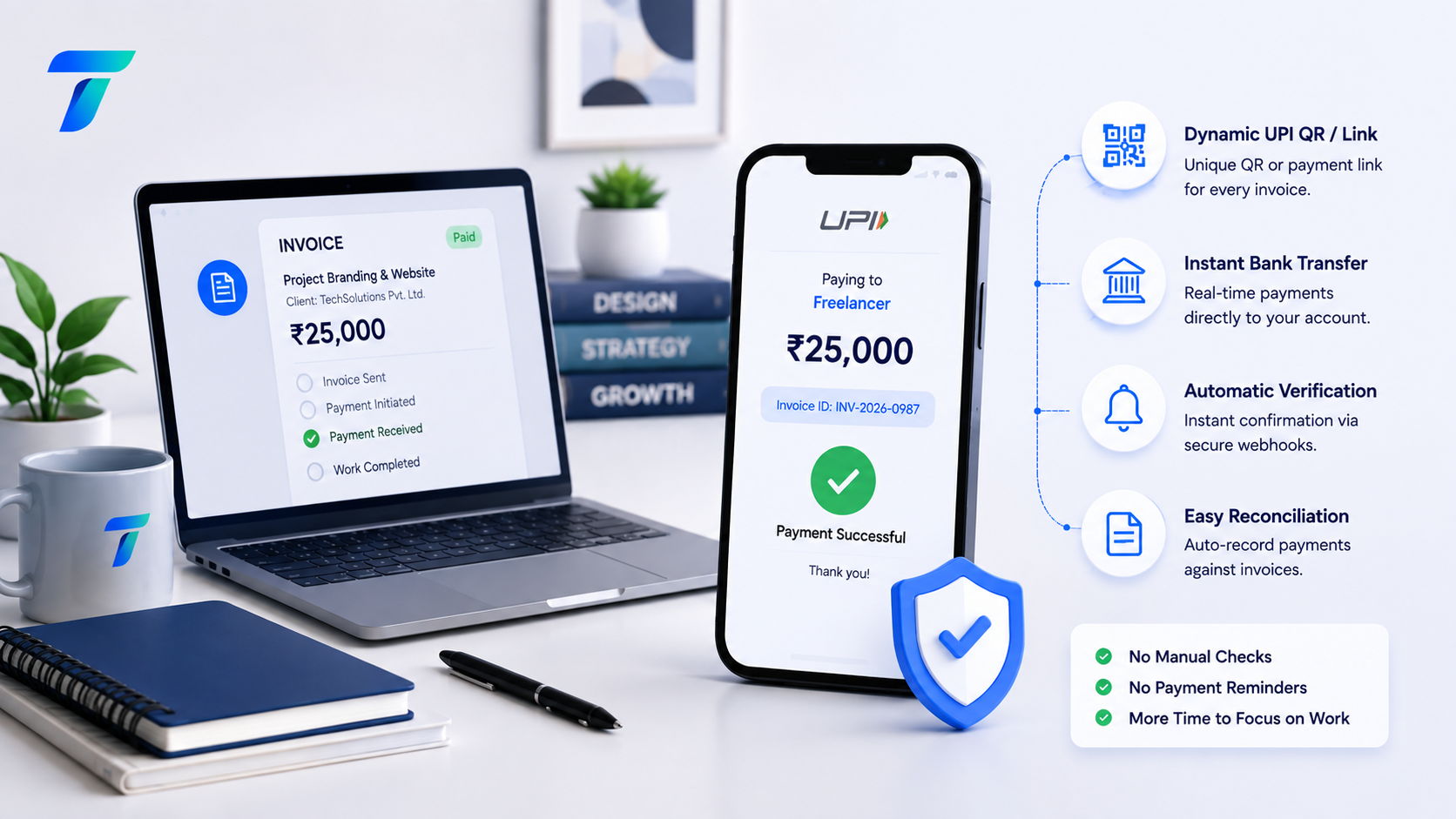
Tinave is a dedicated UPI payment tool designed specifically to eliminate manual transaction checks, payment verification headaches, and screenshot fraud. Built with a focus on simplicity and security, Tinave enables freelancers, consultants, and independent service professionals to collect client payments smoothly.
Freelancer Sends Dynamic Link / QR Code
                  │
                  ▼
Client Scans & Approves in UPI App
                  │
                  ▼
Direct Bank-to-Bank Fund Settlement
                  │
                  ▼
Instant Automated Verification & Status Update
Why Tinave Leads for Independent Professionals
- Dynamic UPI QR Generation: Tinave creates a custom QR code for every bill. The exact project balance is pre-populated, preventing clients from entering incorrect figures or underpaying milestones.
- Instant Automated Verification: You never need to request a transaction reference number or hunt through your text messages. Tinave verifies payments directly against the banking network in real time.
- Direct Bank Account Settlements: Payments move directly into your linked bank account, keeping your operational cash flow predictable.
- Versatile Payment Links: You can generate shareable payment links that work cleanly inside PDF invoices, WhatsApp messages, email proposals, and personal portfolio pages.
- Protection Against Fraud: Because verification is handled through the banking rail rather than uploaded receipts, your business remains fully protected from fabricated payment screenshots.
Best Use Case
Tinave is the premier choice for freelancers, solo service providers, and agency founders who want a fast, automated, and secure UPI collection system without unnecessary setup hurdles.
2. Razorpay
Razorpay is an established payment gateway in India. It caters to businesses of all sizes, offering comprehensive payment collection options that include credit cards, debit cards, net banking, and UPI.
Key Advantages for Freelancers
- Comprehensive Payment Links: Create branded links that can be sent across messaging channels and email.
- Integrated Invoicing: Generate professional invoices with built-in digital payment buttons.
- Multi-Payment Support: Useful if some of your domestic clients prefer paying through corporate credit cards or net banking rather than UPI.
Considerations
The interface contains advanced enterprise settings that can feel overwhelming if you only require simple UPI collections. Account approval and document verification may also take longer for individual freelancers.
3. Cashfree Payments
Cashfree Payments is another major player in the Indian digital payments market, known for its payment links and versatile payout options.
Key Advantages for Freelancers
- Milestone Payment Links: Allows you to create payment requests where clients can pay structured advance deposits.
- Scheduled Invoicing: Set up automated invoice alerts for regular monthly clients.
- Subcontractor Payouts: Helpful if you manage a small team and need to route payments to other freelancers after a project concludes.
Considerations
Cashfree is primarily tailored for expanding businesses and software teams. Solo freelancers looking for a quick, straightforward setup may find the dashboard more complex than necessary.
4. Instamojo
Instamojo was built specifically for independent creators, micro-businesses, and service providers. It simplifies the process of getting paid online without requiring a standalone website.
Key Advantages for Freelancers
- Built-in Service Pages: Set up simple landing pages to sell consulting calls, audits, or pre-packaged design kits.
- Quick Link Sharing: Generate instant payment links to share directly with clients.
- Simple Dashboard: A straightforward interface that tracks basic client details and transaction dates.
Considerations
Instamojo is ideal for selling pre-priced digital items, but it offers less flexibility for customized project invoicing and dynamic, project-specific QR generation.
5. Paytm for Business
Paytm for Business is widely recognized across India, offering merchant payment solutions for both physical retail locations and independent service providers.
Key Advantages for Freelancers
- Universal Acceptance: Recognizes payments from all UPI applications across the country.
- Rapid Account Onboarding: Quick setup if you already maintain an active Paytm user account.
- Unified Business Profile: Track daily inbound collections and access supplementary business banking utilities.
Considerations
Paytm for Business is mainly designed for over-the-counter retail transactions. It provides limited features for integrating dynamic payment links into formal freelance project proposals or digital invoice workflows.
Detailed Feature Comparison Matrix
| Key Capabilities | Tinave | Razorpay | Cashfree | Instamojo | Paytm Business |
|---|---|---|---|---|---|
| Dynamic UPI QR Codes | Yes | Yes | Yes | Limited | Limited |
| Automated Payment Validation | Yes | Yes | Yes | Yes | Limited |
| Direct Bank-to-Bank Transfer | Yes | No | No | No | Yes |
| Lightweight Link Generation | Yes | Yes | Yes | Yes | Limited |
| Simple Non-Technical Setup | High | Moderate | Moderate | High | High |
| Elimination of Fake Slips | Yes | Yes | Yes | Yes | Limited |
| Optimized for Solo Workflows | High | Moderate | Moderate | High | Moderate |
How Dynamic UPI Solves Everyday Freelancing Problems
To understand why automated tools make a substantial difference, consider how standard payment issues are resolved using dynamic UPI technology.
Traditional Invoicing Pain Points         Dynamic UPI Solution
─────────────────────────────────         ────────────────────
Client pays incorrect milestone   ──────► Amount is locked into the QR
Client sends fake payment slip    ──────► System verifies via bank rail
Freelancer spends hours checking  ──────► Status updates automatically
Scenario A: The Underpayment or Overpayment Issue
When a client manually types a figure into their payment app, mistakes happen. A bill for 15,000 rupees can accidentally be entered as 1,500 or 15,500 rupees.
With a dynamic UPI link generated by a tool like Tinave, the exact figure is coded into the request. The client cannot edit the number, ensuring you receive the exact amount agreed upon in your contract.
Scenario B: The Unverified Screenshot
Many freelancers have encountered clients who claim they sent a payment, backing it up with a cropped screenshot. The freelancer begins work, only to discover days later that the funds never arrived in their account.
Automated UPI tools eliminate this risk entirely. The system checks the transaction reference directly against the banking network and sends an instant confirmation only after the funds have settled.
Scenario C: The Retainer Tracking Problem
When handling multiple retainer clients who pay on the first of every month, matching unlabelled bank credits to individual clients is time-consuming.
Dedicated payment tools tag every incoming transaction with the specific client name and invoice number, keeping your project records up to date automatically.
How to Set Up an Automated UPI Workflow for Your Business
Setting up a professional payment collection system requires only a few simple steps.
Step 1: Link Bank Account ──► Step 2: Create Payment Link ──► Step 3: Attach to Invoice ──► Step 4: Auto Confirmation
Step 1: Connect Your Bank Account
Sign up on your selected payment platform and connect your primary business or professional bank account. Complete the required digital identity verification to ensure your profile can accept high-value transactions.
Step 2: Generate Project-Specific Payment Links
When a project milestone is reached, create a payment link or dynamic QR code inside the tool. Enter the client name, project reference, and agreed fee amount.
Step 3: Embed the Link or QR Code in Your Invoice
Add the generated link or dynamic QR code directly to your PDF invoice, email message, or chat communication. Add a clear note instructing the client to click the link or scan the code using any UPI app.
Step 4: Receive Automated Payment Confirmations
Once the client approves the payment on their phone, the platform confirms the transaction and logs it on your dashboard. You can begin the next phase of work without needing to check your bank statements manually.
Conclusion
Running a successful freelance career in India requires both creative talent and dependable business tools. Relying on outdated manual payment methods wastes valuable time and leaves your business exposed to payment disputes and altered screenshots.
Upgrading your workflow with a dedicated UPI payment tool like Tinave ensures you receive exact invoice amounts, eliminates manual bookkeeping tasks, and secures your cash flow with real-time bank settlements.
Select the platform that aligns with your client base, attach dynamic payment options to your next invoice, and spend less time chasing payments and more time delivering exceptional client work.